Risk Register Report

Our Risk Register Report solution lets you track and manage threats and opportunities tailored to suit your organization's terminology using an intuitive and attractive one page report

HOWAnnual License, Glossy
WHATReporting
WHENSince 2026
WHEREPortfolios, Programs, Projects, Issues, Custom Data
WHOExecutive, Planner
WHYEmbedded, Simplification

  1. Solution
    Product Intro Slide
    auto bill

    Risk Register Report

    Manage Threats and Opportunities

    Our Risk Register Report solution lets you track and manage threats and opportunities tailored to suit your organization's terminology using an intuitive and attractive one page report

    previous arrowprevious arrow
    next arrownext arrow
    PlayPause


    Risk Register Report

     
    • Use the slider above to learn about this Solution's functionality
    • Review the More Details section below to understand how to use it
    • Consider the Pricing section and its value to you (noting payment comes later)
    • When you are ready to proceed, click the button above
     

    MORE DETAILS…
    Top

    Our Risk Register Report solution lets you track and manage threats and opportunities tailored to suit your organization’s terminology using an intuitive and attractive one page report

    To use it…

    We will help you run our Setup Package to install our Risk Register Report solution into your Workfront instance, including the dashboards, Magic Reports, filters, views, and additional custom data against which the report then generates.

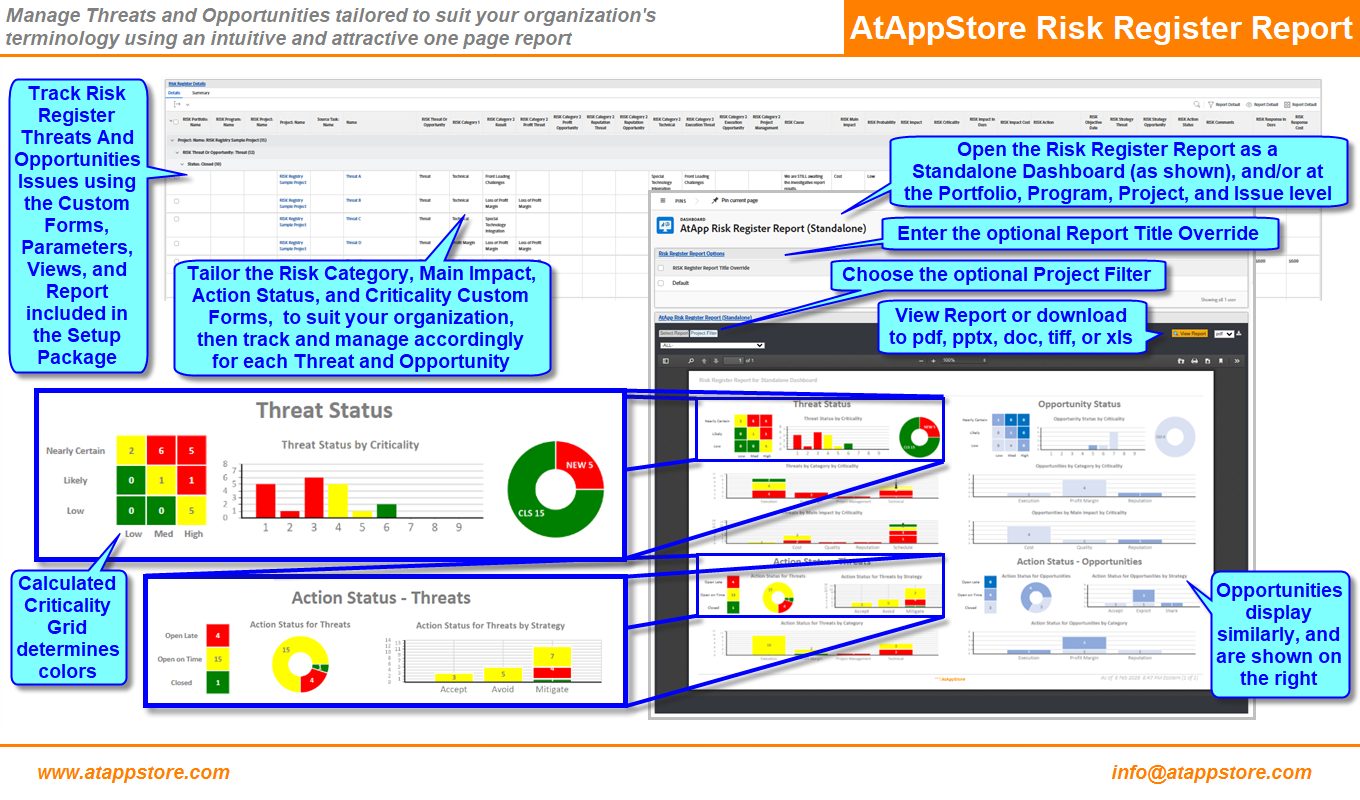
    Refer to the Risk Register Report image in the Media section, which includes a detailed functionality review.

    Once installed, the resulting Risk Registry Report solution then provides all of the following:

    • Track Risk Register Threats And Opportunities Issues using the Custom Forms, Parameters, Views, and Report included in the Setup Package
    • Tailor the Risk Category, Main Impact, Action Status, and Criticality Custom Forms, to suit your organization, then track and manage accordingly for each Threat and Opportunity
    • Open the Risk Register Report as a Standalone Dashboard (as shown), and/or at the Portfolio, Program, Project, and Issue level
    • Enter the optional Report Title Override
    • Choose the optional Project Filter
    • View Report or download to pdf, pptx, doc, tiff, or xls
    • Threats Status are shown on the top left in three sections:
    • Threat Status By Criticality (noting Calculated Criticality Grid determines colors)
    • Threats by Category by Criticality
    • Threats by Main Impact by Criticality
    • Action Status – Threats are then shown on the bottom left in three sections:
    • Action Status for Threats (Open Late, Open on Time, or Closed)
    • Action Status for Threats by Strategy
    • Action Status for Threats by Category
    • Opportunities display similarly, and are shown on the right

    To then configure it for the Users of interest:

    • Share the AtAppDemo Risk Register Report (Standalone), AtAppDemo Risk Register Report (Portfolio), AtAppDemo Risk Register Report (Program), AtAppDemo Risk Register Report (Project), and AtAppDemo Risk Register Report (Issue) dashboards with those Users of interest (e.g. manually, via a group, or make Visible System-Wide)
    • Add our AtAppDemo Risk Register Report (Standalone), AtAppDemo Risk Register Report (Portfolio), AtAppDemo Risk Register Report (Program), AtAppDemo Risk Register Report (Project), and and AtAppDemo Risk Register Report (Issue) dashboards and custom sections to those Users of interest either manually (temporarily, to test), or (recommended, when you are ready) via their Layout Templates
    • Share the RISK Register (Issue Level) and RISK Register Report Options (User Level) custom forms, Risk Register Report Options and Risk Register Details reports, Risk Register Threats And Opportunities (Issue Level) filter, and Risk Register Details (Issue Level) view with those Users of interest (e.g. manually, via a group, or make Visible System-Wide)
    • Use the reports, filter, and view to create and track the Risk Register Report custom form parameters for each Threat or Opportunity Issue of interest

    And finally, to test it for the Users of interest:

    • Login As one of those Users of interest (for context)
    • Open the AtAppDemo Risk Register Report custom tab on a Portfolio, Program, Project or Issue of interest
    • Set the desired Report Settings
    • Click View Report to render the report
    • Assess the results (e.g. adjusting the Report Settings and re-running the report to Show more details)

     
    PRICING
    Top

    From $7,999/Year (unlimited use)

    Since our Swimlane Report solution is based on our Magic Reports technology, if you’d like us to tailor it to suit your needs exactly, we’d be happy to discuss a fixed quote to do so.


    Other Reporting Solutions…

    Reporting solutions include every aspect of your data, and help you leverage the efforts you’ve put into collecting it by presenting it in engaging, insightful, actionable ways that reinforce and extend its value

    Top


    AFA Burn Check

    AFA Burn Check

    Prepare to
    Manage Margins

    previous arrowprevious arrow
    next arrownext arrow
    PlayPause