
Our UberFilter solution can spare you loads of report cloning and maintenance effort by letting your users choose a dashboard level filter that will update the filters of all related reports at once vs separate prompting.
HOWAnnual License, Image
WHATConfiguration, Reporting
WHENSince 2017
WHEREIssues, Projects, Tasks, Users
WHOExecutive, Planner, SysAdmin, Worker
WHYData Processing, Embedded, Simplification

  1. Solution
    Product Intro Slide

    UberFilter

    Accelerate Filtering

    Our UberFilter solution can spare you loads of report cloning and maintenance effort by letting your users choose a dashboard level filter that will update the filters of all related reports at once vs separate prompting.

    previous arrowprevious arrow
    next arrownext arrow
    PlayPause


    UberFilter

     
    • Use the slider above to learn about this Solution's functionality
    • Review the More Details section below to understand how to use it
    • Consider the Pricing section and its value to you (noting payment comes later)
    • When you are ready to proceed, click the button above
     

    MORE DETAILS…
    Top

    Our UberFilter solution can spare you loads of report cloning and maintenance effort by letting your users choose a dashboard level filter that will update the filters of all related reports at once vs separate prompting.

    To use it…

    There are a few simple steps involved to enable UberFilter in your Workfront environment:

    • For each report you want to enable for UberFilter, create a filter (typically with the same name as the report) that will return the maximum amount of data any one person might need
    • In the each report’s description, add a suffix that says “DefaultFilterName=xxx”, where xxx is the new filter’s name
    • Create one or more filters (with good naming conventions)that you want users to be able to select within UberFilter “on top” of the default filter
    • Create a dashboard with such reports of interest placed on it
    • Add an external page at the top of the Dashboard (typically with the same name as the dashboar)
    • Enter https://www.atappstore.com/tools/UberFilter.aspx?s={!$$SESSION}&o={!ID} in the URL of that external page
    • Set the height of the external page (typically 200 to 600)
    • Save and view the dashboard
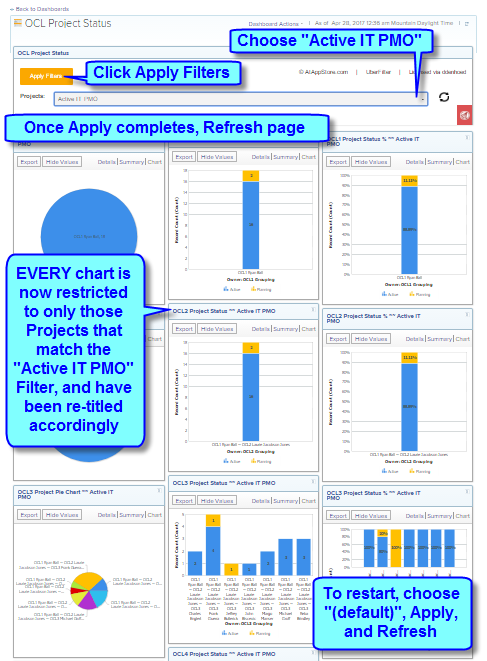
    • UberFilter will automatically detect the report types present and show the appropriate filter dropdown(s)
    • Choose a filter, click apply, and refresh the page
    • Each UberFilter enabled report will be updated and suffixed accordingly, displaying the filtered results all at once

    NOTE: UberFilter does not support applying “OR” filters at this time

    PRICING
    Top

    From $4,999/Year (unlimited use)

    Your first year’s annual license of our UberFilter solution includes up to four hours for installation and training.


    Other Reporting Solutions…

    Reporting solutions include every aspect of your data, and help you leverage the efforts you’ve put into collecting it by presenting it in engaging, insightful, actionable ways that reinforce and extend its value

    Top


    AFA Burn Check

    AFA Burn Check

    Prepare to
    Manage Margins

    previous arrowprevious arrow
    next arrownext arrow
    PlayPause

  2. Related Products