Excel Updater
Manipulate Data
Our Excel Updater solution affords you a cost-effective path to integrate data into Workfront without having to learn the API, write code, or set up a server, and is ideal for both one time and reoccurring data loads.


Our Excel Updater solution affords you a cost-effective path to integrate data into Workfront without having to learn the API, write code, or set up a server, and is ideal for both one time and reoccurring data loads.
| HOW | Annual License, Image, On Demand, Video |
| WHAT | Actuals, Budgeting, Configuration, Financials |
| WHEN | Since 2011 |
| WHERE | Companies, Custom Data, Expenses, Hours, Issues, Portfolios, Programs, Projects, Tasks, Users |
| WHO | Planner, SysAdmin |
| WHY | Data Processing, Schedulable, Simplification |
Our Excel Updater solution affords you a cost-effective path to integrate data into Workfront without having to learn the API, write code, or set up a server, and is ideal for both one time and reoccurring data loads.


Our Excel Updater solution affords you a cost-effective path to integrate data into Workfront without having to learn the API, write code, or set up a server, and is ideal for both one time and reoccurring data loads.
To use it…
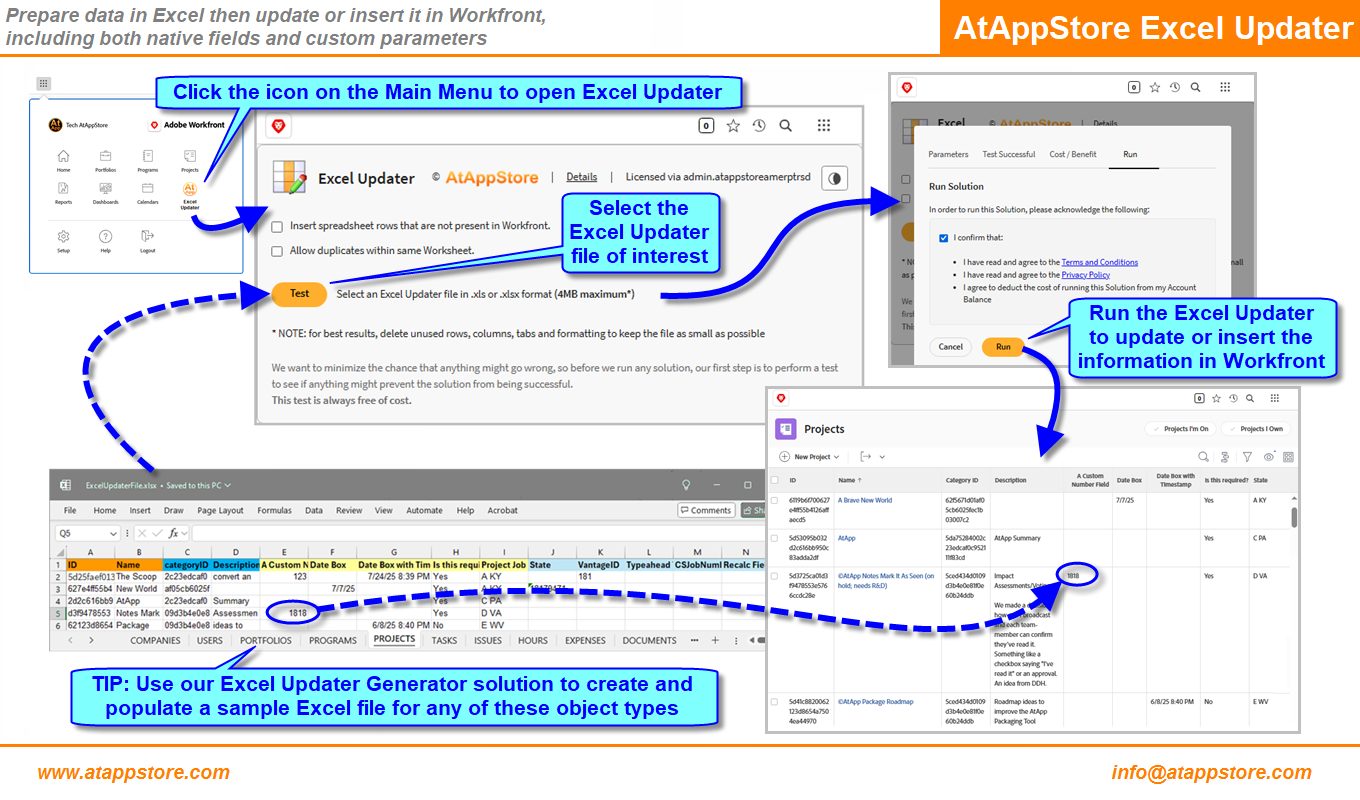
Create a specially formatted Excel Updater file, then run our Excel Updater solution to upload that file and process its COMPANIES, DOCUMENTS, EXPENSES, ISSUES, PORTFOLIOS, PROGRAMS, PROJECTS, TASKS, USERS, and HOURS tab(s) to insert or update the data from Excel into Workfront. The data in the Excel file can be for Workfront core fields (e.g. Name, Description, etc.), as well as Parameter fields (e.g. those in Custom Data). You can also to overwrite, prepend, or append text values. Please refer to the Related Files below for more information, examples, and tips.
NOTE: the Excel Updater might not work with objects that include multiple Custom Forms, nor does it support Form Logic at this time
PRICING
Top
From $0.50/Row, to a maximum of:
$899/Day
$3,599/Week
$13,499/Month
$44,999/Year
NOTE: The cost is per row in the spreadsheet, but with no charge for a row whose Excel file data matches what is already in Workfront.
Other Configuration Solutions…


Our Scheduled Excel Updater solution offers you a straightforward approach to periodically load data into Workfront by automatically submitting files to our Excel Updater solution at a cadence you choose.
| HOW | Image, Purchase |
| WHAT | Actuals, Budgeting, Financials |
| WHEN | Since 2014 |
| WHERE | Companies, Custom Data, Expenses, Hours, Issues, Portfolios, Programs, Projects, Tasks, Users |
| WHO | Planner, SysAdmin |
| WHY | Automation, Data Processing, Schedulable, Simplification |

Our Excel Updater Generator solution gives you the sample format for our Excel Updater solution along with an accompanying view definition (including custom data) ready to copy and paste right into Workfront.
| HOW | Free, Image, Video |
| WHAT | Configuration |
| WHEN | Since 2011 |
| WHERE | Companies, Custom Data, Expenses, Hours, Issues, Other, Portfolios, Programs, Projects, Tasks, Users |
| WHO | Planner, SysAdmin |
| WHY | Data Processing, Simplification |